One-Click Docking with AutoDock Vina — No Install
Run rigid-receptor AutoDock Vina in the browser. Meeko prepares the receptor and ligands automatically. Enter a PDB ID or upload a receptor file, submit SMILES or SDF ligands, and you get an affinity table, interaction figures, a PDF report, and a ZIP of the docked poses. No need to install Vina or set up conda locally.
AutoDock Vina online
Same Vina engine students cite in Methods — runs in the browser
Thesis-ready exports
PDF report, affinity CSV, 2D/3D poses — paste into your lab report
Prep & interpret guides
PDBQT prep, vina score meaning, and common pitfalls
Platform features
Automated Pipeline
End-to-end automated molecular docking: Meeko handles receptor and ligand PDB preparation, then AutoDock Vina scores poses — no manual PDBQT scripting.
Cloud-Native Vina Webserver
Run the full Vina webserver workflow in your browser. Zero local dependencies — no conda, Meeko, or RDKit install on your machine.
Professional Reports
Automated PDF result generation with affinity tables, interaction figures, and pose exports — ready for manuscripts and SAR write-ups.
Our Automated Molecular Docking Workflow
Automated rigid-receptor docking for scientific research and virtual screening. Review the pipeline below before you submit — especially binding-site setup and pose QC.
Setup & validation
Receptor input
PDB ID download or upload your own .pdb. Multi-chain PDBs are supported — select one protein chain per job at review.
Ligand input
Single SMILES or batch screening: one SMILES per line, or import a multi-record .sdf file. Platform cap is 300 ligands/job; your plan sets the batch limit (see Pricing).
Review before you run
Two-step flow: validate setup (0 credits), then dock. Catch protein, box, and ligand issues before spending compute.
Ligand precheck
Molecular weight, rotatable bonds, and Meeko TORSDOF with clear warn/reject thresholds for Vina-friendly sizes.
Computational ADMET
RDKit Lipinski, Veber, and QED summaries at validate and in results (local calculation — no external API).
Binding site options
Auto box from co-crystal ligand; apo pocketeer top-3 pocket picker; pocket residue anchors (e.g. 214,226,245); optional custom XYZ box. Warns if the box center is far from the protein.
3D box preview
See receptor + docking box in 3Dmol during review. Apo structures show an explicit disclaimer to compare with literature.
Faster re-validation
Change ligands only? Protein/box validation is cached in your browser session — no PDB re-download.
Docking engine
AutoDock Vina (rigid receptor)
Meeko receptor/ligand prep, dimorphite-DL protonation at job pH (default 7.4), RDKit ETKDG + MMFF94. Fixed Vina settings (exhaustiveness 8, 9 modes).
Parallel batch docking
Jobs with 2+ ligands run up to 4 parallel Vina workers on the server. A single failed ligand does not cancel the rest of the batch.
Co-crystal redock check
When a bound ligand is detected, optional RMSD sanity check vs the crystal pose. On by default for single-ligand jobs; off by default for batch (enable in Advanced).
Optional metals
Preserve selected HETATM records (e.g. ZN, MG) in the cleaned receptor.
Results & deliverables
Top 3 poses per ligand
Best-scoring Vina modes exported as SDF/PDB complexes in the ZIP bundle.
Pose quality & confidence
PoseBusters QC (Pass / Warn / Fail) with basic fallback. Pose confidence text from score gap + QC downgrade rules.
Protein–ligand interactions
PLIP when available; distance-heuristic fallback if PLIP fails. 2D interaction diagram, binding-site overview PNG, and ligand 2D structure PNG.
Binding mode interpretation
English discussion paragraph per ligand from affinity, interactions, and pose separation — shown on the result page and in the PDF.
PyMOL publication render
Optional headless PyMOL ray-traced binding-site PNG (cartoon + sticks). Enable in Advanced options; batch jobs render the best hit only.
Batch screening table
Multi-ligand jobs: sortable table with affinity, pose confidence, QC, and ADMET columns (MW, Lipinski, QED).
Interactive 3D viewer
Inspect protein–ligand complexes and switch between exported poses in the browser.
PDF report & Methods copy
Download a PDF with embedded figures. One-click copy of English Methods text and a citation paragraph with numbered references for your manuscript.
Optional AI paper draft
After docking completes, generate a Gemini-assisted Discussion + figure legends draft (+1 credit). Not a substitute for human peer review or expert editing.
Results ZIP (structure bundle)
Download results.zip with poses, complexes, figures, ADMET/interaction JSON, and run_manifest.json — see the ZIP contents breakdown on this page.
Professional AutoDock Vina Docking Report: Metrics & Visualization
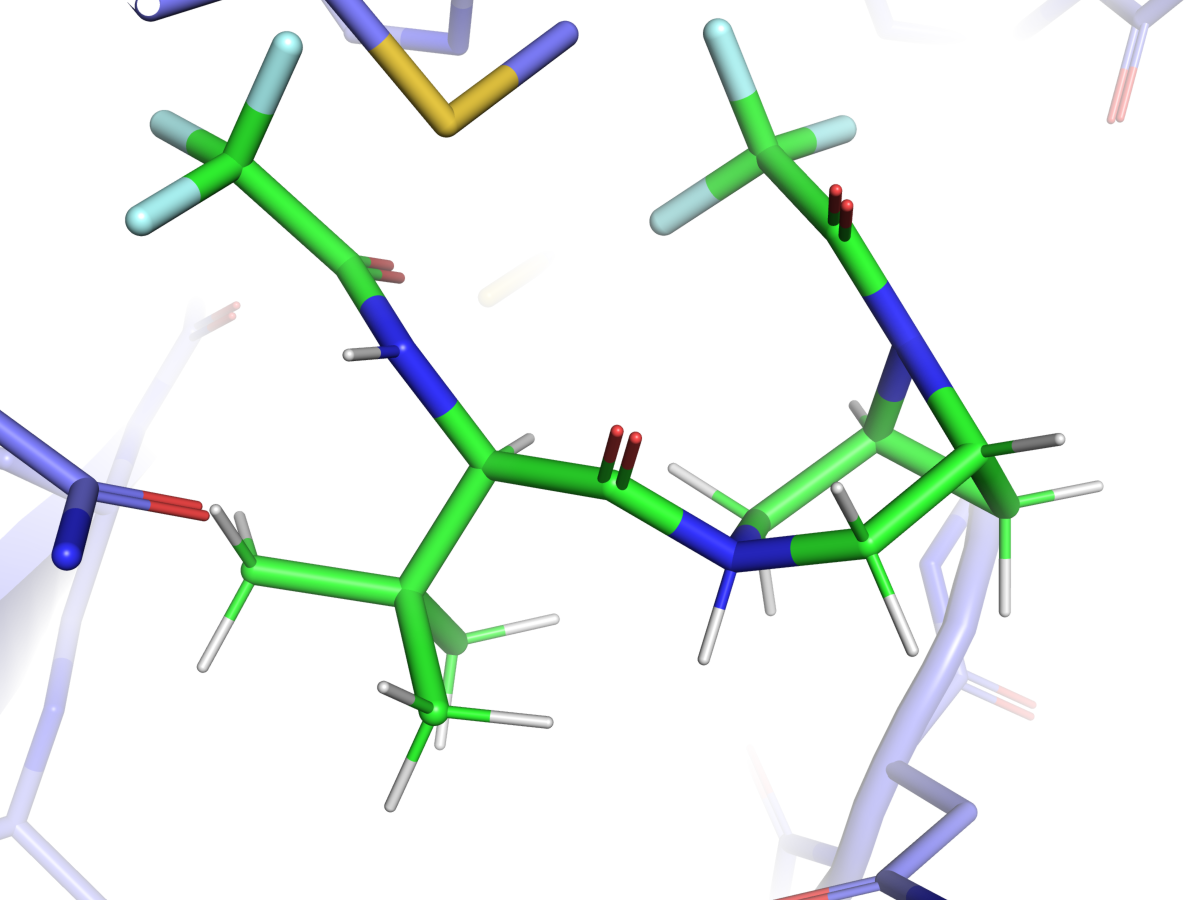
Real output from PDB 6LU7 (SARS-CoV-2 main protease (Mpro)): ranked virtual screening table with PLIP interaction diagrams, PoseBusters pose QC, ADMET analysis columns, and PyMOL binding-site visualization for the top hit.
- Receptor
- 6LU7 · chain A
- Best affinity
- -6.21 kcal/mol
- Batch size
- 3 ligands · 3 docked OK
- Top hit
- Nirmatrelvir
AutoDock Vina predicted moderate binding for CC(C)(C)C(NC(=O)C(F)(F)F)C(=O)N1CC2CC(C1)N2C(=O)C(F)(F)F (best score -6.21 kcal/mol). Among the screened compounds, CC(C)(C)C(NC(=O)C(F)(F)F)C(=O)N1CC2CC(C1)N2C(=O)C(F)(F)F ranked as the top hit. Key predicted interactions (PLIP) include 2 hydrogen bond(s) with ASN142A, GLN189A; hydrophobic contacts involving ASN142A; halogen bond(s) with HIS41A, THR26A. The ligand is surrounded by pocket residues including ASN142A, GLN189A, HIS41A, THR26A. Multiple docking modes have similar scores; consider inspecting alternate poses in the structure files. These results are computational predictions only and should be validated experimentally (e.g., SPR, ITC, or cell-based assays) before drawing mechanistic conclusions.
| # | Compound | Affinity |
|---|---|---|
| 1 | Nirmatrelvir | -6.21 |
| 2 | Ibuprofen | -6.03 |
| 3 | Aspirin | -5.05 |
Computational predictions only — validate binding modes before drawing conclusions in a thesis or paper.
What’s in the results ZIP?
Every completed docking job includes a results.zip alongside the on-page report and PDF. Use the ZIP for PyMOL/Chimera, offline tables, and reproducibility — the PDF is a human-readable summary of the same run.
PDF report: affinities, pose QC, interaction figures embedded for printing — not a substitute for the structure files in the ZIP.
Job root (once per run)
- result.json
- Summary of docked ligands, failures, scores, and redock status.
- run_manifest.json
- Reproducibility record: pipeline version, Vina settings, box, pH, receptor chain, warnings.
- receptor_clean.pdb
- Prepared receptor used for docking (rigid, cleaned PDB).
- redock_report.json
- Co-crystal redock RMSD check (single-ligand / when enabled).
Per successfully docked ligand
- poses/{ligand}.sdf
- Top 3 Vina poses as multi-record SDF.
- complexes/{ligand}_complex.pdb
- Protein–ligand complex for 3D viewers.
- ligands/{ligand}/
- Ligand PDBQT, docked PDBQT, and protonated SMILES.
- admet/{ligand}.json
- RDKit Lipinski, Veber, QED, and related flags.
- interactions/{ligand}.json
- PLIP interaction table (or distance-heuristic fallback).
- figures/{ligand}/
- 2D interaction diagram, binding-site overview PNG, ligand 2D structure; optional pymol_binding_site.png if PyMOL was enabled.
Supported Capabilities
Core platform features included in every paid and free-tier docking run.
| Capability | Description |
|---|---|
| AutoDock Vina Engine | Production rigid-receptor docking with Meeko prep, fixed reproducible settings (exhaustiveness 8, 9 modes). |
| Batch Docking | Parallel Vina workers for multi-ligand virtual screening — up to 300 ligands per job. |
| PDB Preparation | Automated receptor cleaning, protonation, and ligand PDBQT generation via Meeko + RDKit. |
| PDF Reporting | Publication-ready PDF with affinity tables, Methods text, and embedded figures. |
| PoseBusters QC | Automated pose quality checks (Pass / Warn / Fail) with confidence scoring. |
| ADMET Analysis | RDKit Lipinski, Veber, and QED summaries computed locally for each ligand. |
| Interaction Diagrams | PLIP protein–ligand interactions with 2D diagrams and binding-site overview PNGs. |
| Virtual Screening | Sortable batch results table with affinity, pose QC, and ADMET columns. |
Computational scores, poses, ADMET, and interactions are model predictions only. Always validate binding modes and drug-likeness with experiments and literature before drawing conclusions in a manuscript or report.
Open-source stack & citations
This pipeline uses AutoDock Vina 1.2.7 and Meeko 0.7.1 (pipeline v1.9.4), with fixed settings: exhaustiveness 8, 9 modes, and energy range 3 kcal/mol.
MolecularDocking.online runs a documented, citable pipeline — not a black box. Every job records exact software versions in run_manifest.json and on your result report. Use the citation paragraph on your result page for manuscript Methods sections.
Pipeline v1.9.4 · versions below are typical defaults; your job manifest lists the exact build used.
| Component | Version | Developer / org | Role | Ref. |
|---|---|---|---|---|
AutoDock Vina | 1.2.7 | Scripps Research / community fork | Rigid-receptor molecular docking | [2] |
Meeko | 0.7.1 | Scripps Research (Forli lab) | Receptor and ligand PDBQT preparation | [3] |
RDKit | 2025.3.6 | Open-source cheminformatics toolkit | SMILES → 3D embedding (ETKDG) and MMFF94 minimization | [4] |
PLIP | 3.0.0 | University of Hamburg (Salokas et al.) | Protein–ligand interaction profiling | [5] |
PoseBusters | 0.6.5 | University of Oxford (Buttenschoen et al.) | Docking pose quality validation (dock configuration) | [6] |
dimorphite-DL | 2.0.2 | Open-source protonation enumerator | Ligand protonation states at job pH | [7] |
Biopython | 1.87 | Open-source bioinformatics library | Structure parsing and receptor handling | [8] |
pocketeer | 0.3.1 | Apo binding-site prediction | Predicted pocket ranking for apo receptors | [9] |
Standard references
- MolecularDocking.online. MolecularDocking.online. Cloud molecular docking workflow (https://molecular-docking.online). Accessed 2026.
- AutoDock Vina. Eberhardt J, Santos-Martins D, Forli S, Olson AJ. AutoDock Vina 1.2.0: new docking methods, expanded force field, and Python bindings. J Chem Inf Model. 2021;61(8):3891-3898.
- Meeko / AutoDock suite. Forli S, Huey R, Pique ME, Sanner MF, Olson AJ. Computational protein-ligand docking and virtual drug screening with the AutoDock suite. Nat Protoc. 2016;11(5):905-919.
- RDKit. RDKit: Open-source cheminformatics. https://www.rdkit.org/ (accessed 2024).
- PLIP. Salokas LM, Viswanath S, Aho AJ, et al. PLIP 2021: expanding the scope of the protein-ligand interaction profiler to DNA and RNA. Nucleic Acids Res. 2023;51(W1):W530-W534.
- PoseBusters. Buttenschoen GF, Morris GM, Deane CM. PoseBusters: AI-based docking methods fail to generate physically valid poses or cause unintended bias. Nat Methods. 2024;21(3):472-480.
- dimorphite-DL. Swain M. dimorphite-DL: an open-source program for enumerating the ionization states of drug-like small molecules. J Cheminform. 2019;11(1):14.
- Biopython. Cock PA, Antao T, Chang JT, et al. Biopython: freely available Python tools for computational molecular biology and bioinformatics. Bioinformatics. 2009;25(11):1422-1423.
- pocketeer. pocketeer: apo binding-site prediction tool used for pocket ranking in this pipeline.
Workflow documentation
From “what is docking” to vina score meaning — guides written for coursework deadlines, not research marketing.
What is a good Vina score?
No universal cutoff — relative ranking, redock benchmarks, and Discussion sentences markers accept.
Read articleAutoDock Vina common errors
Fix PDBQT parse failures, empty poses, bad boxes, and MGLTools crashes — plus online workarounds.
Read articleDocking Methods for your thesis
Copy-paste Methods/Results templates and a publication-style PDF/ZIP checklist.
Read articleHow to read docking scores & poses
Affinity in kcal/mol, pose quality checks, and what Vina scores do — and do not — prove in a research report.
Read articleYour first docking run, step by step
Download a PDB, prepare ligands, run Vina, inspect poses, and draft the Methods section for your manuscript.
Read articleStructured learning roadmap
A four-week plan covering structures, Vina, visualization, and critical interpretation of docking output.
Read articleBuilt for research workflows
Medicinal chemistry SAR, structure-based hit discovery, ADMET-aware virtual screening, and cloud-native AutoDock Vina pipelines.
Medicinal chemistry & SAR
Batch SMILES screening, ranked Vina affinities, PLIP interaction diagrams, and exportable tables for lead optimization.
Toxicology & ADMET screening
Dock ligands to off-target receptors, combine RDKit ADMET flags with interaction analysis, and document risk hypotheses in reports.
Structural biology & target validation
Rigid-receptor Vina docking with co-crystal redock checks, pose QC, and reproducible Methods metadata in run_manifest.json.
Cloud vs local pipelines
Same AutoDock Vina + Meeko stack without conda setup — browser workflow with ZIP bundle and PDF reporting for your team.
Documentation & onboarding
Workflow guides for PDB selection, binding-site definition, and interpreting PoseBusters QC — then validate setup free (0 credits).
Virtual screening & hit lists
Screen 20–300 ligands per job, compare ranked poses and affinities, and export CSV/ZIP for hit prioritization and SAR follow-up.
Trusted by research teams in med-chem & structural biology
“We screened 30 analogs against a kinase target in one batch job. Review setup caught a chain ID issue before compute spend — the PDF and pose ZIP were ready for our weekly SAR review.”
“Our lab moved from local Meeko+Vina scripts to this cloud pipeline. Batch docking, PLIP tables, and PoseBusters QC in one run — no more patching conda on shared workstations.”
“The redock sanity check flagged a mis-set binding box before we burned credits on a full library screen. Automatic refund when a corrupt PDB blocked delivery — solid ops.”
Dock Credits & Plans
Monthly Credits for regular use. Higher tiers add concurrent jobs and priority queue. One-time packs available when you need a top-up.
Same docking deliverables on every tier: setup review · Vina (top 3 poses) · pose QC · PLIP · ADMET · PDF/ZIP. Optional PyMOL figures (+0.5 credit/job).
Free tier: 1 Credit at signup — try a small docking job. One Free account per email, device, and network. No monthly refresh. No credit card required.
Try it out
Includes
- 1 credits (one-time) — at signup only
- 7-day result storage
Course projects
Includes
- 5 credits / month
- 14-day result storage
Small lab
Includes
- 16 credits / month
- 2 concurrent jobs
- Priority queue
- 30-day result storage
Lab team & research group
Includes
- 35 credits / month
- 5 concurrent jobs
- Priority queue
- 90-day result storage
One-time packs (no subscription required — stacks with subscription)
Adds Credits to your account. Each Run docking spends Credits by ligand count (see How Credits work). Concurrency and queue priority follow your current plan — Free or subscription.
Perfect for 1 complete thesis figure + AI draft (Docking + PyMOL + AI Report).
- 3 credits (one-time)
Best for screening up to 30 ligands or 3-4 full project reports (No recurring fee).
- 10 credits (one-time)
All plans include:
How Dock Credits work
Credits pay for each docking run. Subscriptions include monthly Credits; one-time packs are fixed-price bundles you buy separately (see Pricing). Both can sit on the same account.
Credits spent per docking run
When you click Run docking, Credits are deducted from your balance by ligand count — whether those Credits came from Free, a subscription, or a one-time pack. This section is about spending Credits, not one-time pack prices.
One-time packs (Single Run Pass, Screening Pack) are sold at a fixed price for a bundled Credit amount on the Pricing → One-time tab. You are not billed per ligand at checkout — the table below shows how those Credits are used each time you run docking.
- 1–3 ligands: 1 Credit
- 4+ ligands: 1 Credit per 5 ligands, rounded up (4–5 ligands = 1 Credit; 12 ligands = 3 Credits)
- PyMOL publication figures: +0.5 Credit per job (optional)
- Optional AI paper draft (Gemini Discussion + figure legends): +1 Credit, charged separately when you generate it after docking completes
- Example: 25 ligands + PyMOL = 5 + 0.5 = 5.5 Credits
Credits spent per run (reference)
| Ligands | Credits | + PyMOL |
|---|---|---|
| 1 | 1 | 1.5 |
| 2 | 1 | 1.5 |
| 3 | 1 | 1.5 |
| 4 | 1 | 1.5 |
| 5 | 1 | 1.5 |
PyMOL adds +0.5 Credit per job. AI paper draft is +1 Credit, billed separately after docking. Applies to any Credit balance (Free, subscription, or one-time). Other batch sizes: 1–3 ligands = 1 Credit; 4+ = 1 Credit per 5 ligands (rounded up).
When Credits are charged
- Credits are deducted when you submit a docking job (not when it finishes)
- Subscription Credits are always used first; one-time pack Credits are used only after your subscription balance for the period is exhausted
- Free plan: 1 Credit granted once at signup (enough for one 1–3 ligand job without PyMOL); unused Credits do not roll over and are not refreshed monthly. One credit grant per email; one Free account per device and network.
- Paid plans: monthly subscription Credits reset at the start of each billing period
Upgrading your subscription
- When you upgrade (e.g. Student → Research), your previous subscription is cancelled automatically — you never keep two paid plans at once
- Unused subscription Credits from the old plan do not carry over; your new plan starts with its full monthly allowance (e.g. Research = 16 Credits)
- One-time pack Credits you bought separately are not removed when you upgrade — they stay in your account until used
Subscription + one-time packs together
- You can buy a subscription and one-time packs — both stay on your account
- One-time packs: Single Run Pass (3 Credits), Screening Pack (10 Credits). Credits are added to your purchased balance and spent per run using the rules above
- One-time pack Credits do not expire with the monthly cycle; subscription Credits reset each billing period (Free signup Credits are one-time only)
- Jobs always spend subscription Credits first, then one-time Credits
- We recommend subscribing or upgrading when you need more monthly usage; one-time packs are always available on the pricing page as an alternative
Service failures & credit refunds
Docking runs on our servers; you pay Credits to run the calculation and receive a report/ZIP. A ligand that does not dock successfully (invalid structure, prep error, no usable pose, or per-ligand timeout) is a normal scientific outcome — the job still delivers results and Credits are not refunded. If a batch hits the 3-hour job time cap, completed ligands are delivered in a partial ZIP; unfinished ligands are marked skipped — no partial credit refund. A service failure means our platform could not finish or deliver your report/ZIP (system error, crash, or timeout before any delivery). In that case, Credits charged for that job are fully refunded automatically (see Credit history). Batch jobs are charged once at submit for the whole batch. Subscription payments are separate from job Credits.
Result storage
Completed jobs are stored by plan: Free 7 days, Student 14 days, Research 30 days, Lab 90 days. Files are then removed — save your ZIP/PDF locally. Free users can extend a job once or twice (+14 days each) for 0.5 Credit from the dashboard.
Frequently asked questions
How does Dock handle ligand protonation, hydrogen addition, and partial charges?
Ligands are ionized with dimorphite-DL at the job protonation pH (default 7.4; adjustable from 4.0 to 10.0). Explicit hydrogens are added during RDKit 3D embedding (ETKDGv3, multi-seed retries), followed by MMFF94 minimization (UFF fallback). Meeko MoleculePreparation then assigns AutoDock atom types and partial charges when writing ligand PDBQT. Protonated SMILES, pH, optimizer, and prep warnings are recorded in run_manifest.json and echoed in your PDF Methods section.
Do you support ligands with many rotatable bonds?
Yes, within limits appropriate for AutoDock Vina rigid-receptor docking. Meeko tags every non-terminal rotatable bond in the ligand PDBQT (reported as TORSDOF). Review setup warns above 12 rotatable bonds or TORSDOF and rejects above 20. Highly flexible ligands may run slowly or yield incomplete conformational sampling — consider more rigid analogues or induced-fit methods on other platforms. Molecular weight is capped at 900 Da (warning above 600 Da).
What is your end-to-end docking pipeline?
Receptor: RCSB PDB download (4-character PDB ID, e.g. 6LU7) or user upload → Biopython cleanup (waters and co-crystal ligands removed; optional ZN/MG HETATM preservation) → Meeko Polymer rigid receptor PDBQT. Ligand: SMILES or SDF → dimorphite-DL protonation → RDKit 3D conformer → Meeko ligand PDBQT. Docking: AutoDock Vina (exhaustiveness 8, nine modes, energy range 3 kcal/mol) with the top three poses exported per ligand. Post-processing: PLIP protein–ligand interactions, PoseBusters pose QC, and RDKit Lipinski/Veber/QED summaries.
Is the receptor flexible, or only the ligand?
Rigid-receptor docking only: protein side chains remain fixed after Meeko receptor preparation. Ligand flexibility follows Meeko rotatable-bond roots (TORSDOF in PDBQT). Induced-fit docking, flexible side chains, covalent docking, and membrane-protein workflows are not supported in this pipeline.
How is the AutoDock Vina search box defined?
At Review setup you choose one of four box sources: (1) co-crystal ligand centroid (holo structures), (2) apo pocket prediction (pocketeer — top three pockets selectable), (3) pocket residue anchors (e.g. 214,226,245), or (4) a custom XYZ center. Default box dimensions are 20 × 20 × 20 Å. A 3D preview shows the receptor and box before Credits are spent. Apo pocket predictions include an explicit disclaimer to compare with literature or co-crystal structures.
What does Review setup (0 credits) validate before docking?
Review setup parses or downloads your receptor, resolves the binding box, and runs ligand prechecks (SMILES validity, molecular weight, rotatable-bond count, Meeko TORSDOF) with a 3D box preview — without charging Credits. Ligand PDBQT generated here is reused at docking time (protonation locked from the validated step). Fix any errors shown, then Run docking charges Credits only on submit.
What AutoDock Vina settings are fixed? Can I change exhaustiveness?
Vina parameters are fixed for reproducibility: exhaustiveness = 8, num_modes = 9, energy_range = 3 kcal/mol, scoring function vina. The three lowest-scoring poses per ligand are exported as SDF and protein–ligand complex PDB files. Custom exhaustiveness, Smina, or GNINA rescoring are not available — version strings and all settings are recorded in run_manifest.json for your Methods paragraph.
How does the co-crystal redock sanity check work?
When a co-crystal ligand is present in the uploaded PDB, Dock can redock it and report heavy-atom RMSD against the crystal pose. Single-ligand jobs enable this by default; batch jobs disable it by default (enable in Advanced). A large RMSD flags a mis-set binding box, wrong chain selection, or protonation mismatch before you screen analogues.
Does molecular docking need a crystallized protein structure?
Not always. A holo crystal structure (protein with a co-crystal ligand) is best for defining the binding site and redock checks. For many discovery projects, an apo structure plus a literature-defined or predicted pocket is acceptable if you state your assumptions clearly.
What is molecular docking?
Molecular docking predicts how a small molecule binds in a protein binding site, producing poses and a score (for example Vina affinity in kcal/mol). It supports computational hypothesis generation — not experimental proof of binding.
How does molecular docking work?
A search grid is placed over the binding site; ligand conformations are sampled and scored by a search algorithm. AutoDock Vina uses rigid-receptor docking (protein fixed, ligand torsions flexible). Dock prepares receptor and ligand PDBQT files with Meeko and records Vina settings, box coordinates, and protonation pH in run_manifest.json and your PDF report.
What is the best molecular docking software for research?
AutoDock Vina remains the industry standard for rigid-receptor docking (fast, well-cited). Dock runs Vina online so you avoid local install. Alternatives like GNINA or DiffDock add ML scoring but differ in setup and reproducibility — for most SAR and screening workflows, Vina plus clear Methods text is the expected baseline.
How can I run molecular docking online?
Enter a 4-character PDB ID (or upload a .pdb receptor), submit SMILES or SDF ligands, run Review setup (0 credits), then click Run docking. You receive a results.zip bundle and PDF report with poses, PLIP interactions, pose QC, and optional PyMOL figures.
What’s in the results ZIP file?
results.zip is the full deliverable for offline work. At the job root: result.json (summary), run_manifest.json (Vina/box/pH for Methods), receptor_clean.pdb, and redock_report.json when applicable. For each docked ligand: top-3 poses (SDF), protein–ligand complex (PDB), ligand PDBQT files, ADMET and interaction JSON, and PNG figures (2D diagram, overview, ligand 2D; optional PyMOL binding-site render). The PDF report mirrors key tables and figures for printing but does not replace the ZIP structures. See the “What’s in the results ZIP?” section under Features on the home page.
Single ligand vs batch: is the report the same? Where are all compounds shown?
The pipeline is the same per successful ligand — each gets poses, complex PDB, ADMET JSON, interaction JSON, and PNG figures. In results.zip, every successfully docked compound has its own files (not just the top hit). On the web report, the results table lists all ligands with scores and QC; binding-mode text, publication figures, ADMET detail, and the 3D viewer show one ligand at a time — use the ligand dropdown in batch jobs (default: best affinity). The PDF lists all ligands in the table but embeds figures and discussion mainly for the top hit. Optional AI manuscript drafts focus on the top hit too. Exception: if PyMOL figures are enabled on a batch job, only the top hit gets a PyMOL PNG (all other per-ligand deliverables still apply). Co-crystal redock is on by default for a single ligand and off by default for batch screening.
How are Credits calculated for a docking job?
A docking run costs 1 Credit for 1–3 ligands, then 1 Credit per 5 ligands rounded up (4–5 ligands = 1 Credit, 6–10 = 2 Credits, etc.). Optional PyMOL figures add 0.5 Credit per job. Credits are checked when you click Run docking, before the job is queued.
When are Credits charged?
Credits are deducted when you submit a docking job, not when it completes. Refunds apply only when our service fails to deliver your report/ZIP (system error, crash, or timeout) — not when individual ligands simply do not dock successfully.
Is a ligand not docking the same as a service failure?
No. Ligand did not dock means the pipeline ran but that molecule could not be prepared or scored (bad SMILES, prep error, per-ligand timeout, etc.) — that is a normal result you paid to test; Credits are not refunded. If a batch hits the 3-hour job cap, you receive a partial ZIP with finished ligands; skipped compounds are listed in the report — still no partial refund. Service failure means our platform could not complete or deliver your job (server error, crash, timeout with no report/ZIP). Service failures are fully refunded. A completed batch with some ligands skipped is still a delivered job — no partial refund.
When do I get Credits back?
Only for service failures: our system error, crash, or timeout before any report/ZIP is delivered. Check Dashboard → Credit history for refund entries. Fix inputs and submit again when ready. Ligand-level outcomes (could not dock, weak affinity) are not refunds.
If some ligands in a batch could not dock, do I get Credits back?
No. Credits are charged once at submit for the whole batch. Skipped, timed-out, or non-docking ligands are normal outcomes and are listed in your report — not grounds for a refund. If the job hits the 3-hour wall-clock cap, you still receive a partial ZIP for completed ligands. Refunds apply only when the entire job fails on our side with no deliverables.
Subscription Credits vs one-time pack Credits?
Subscription Credits reset each billing period and belong to your current plan. One-time pack Credits (Single Run Pass, Screening Pack) are bought separately, do not expire with the month, and are never removed when you upgrade. When you run a job, subscription Credits are always used first; one-time Credits are used only after subscription Credits for the period are exhausted.
What happens when I upgrade my subscription?
Your previous subscription is cancelled automatically — you never keep two paid plans. Unused subscription Credits from the old plan do not carry over; the new plan starts with its full monthly allowance (e.g. upgrading to Research gives 16 Credits). One-time pack Credits you bought separately are kept. You will be asked to confirm this before upgrading from your dashboard.
How much does Dock cost?
Dock offers a Free plan at $0/month (1 Credit at signup, no credit card required). Paid monthly subscriptions: Student Plan $9.99/month (5 Credits/month), Research Plan $24.99/month (16 Credits/month, 2 concurrent jobs, priority queue), and Lab Plan $49.99/month (35 Credits/month, 5 concurrent jobs, priority queue). One-time credit packs with no subscription: Single Run Pass $7.99 (3 Credits) and Screening Pack $19.99 (10 Credits). All paid tiers include the same docking pipeline (Vina, PLIP, ADMET, PDF/ZIP). Pricing and limits match the plans shown in the Pricing section on this page.
What do Student, Research, and Lab plans include?
Student Plan ($9.99/mo): 5 Credits/month. Research Plan ($24.99/mo): 16 Credits/month, 2 concurrent jobs, priority queue. Lab Plan ($49.99/mo): 35 Credits/month, 5 concurrent jobs. Batch size is gated by Credits (up to 300 ligands/job). All plans include the full docking pipeline. See Pricing for details.
Can I buy Credits without a subscription?
Yes. Single Run Pass ($7.99): 3 Credits. Screening Pack ($19.99): 10 Credits. Credits are spent per run by ligand count; concurrency and queue priority follow your plan tier (see Pricing).
What is your subscription refund policy?
You can cancel a subscription anytime to stop future charges. Past subscription payments are generally non-refundable except where required by law. Docking job Credits are separate: they refund automatically only for service failures (no report/ZIP delivered), not for ligands that did not dock.
How long are results kept?
Retention depends on your plan: Free 7 days, Student 14 days, Research 30 days, Lab 90 days. Free users can extend a completed job twice (+14 days each) for 0.5 Credit from the dashboard. Download your ZIP and PDF before expiry.
Platform Activity
Open metrics from production — no marketing fluff.
Updated from production logs · last refresh June 2026